
Best Video Email Platforms: 5 Compared
By Ryane Tully · August 29, 2026
For a solo seller recording a fresh message for each prospect, start with Loom or BombBomb. For a small team personalizing video across hundreds of leads, shortlist Pitchlane and Sendspark: pick Pitchlane when one spoken pitch can stay fixed while each prospect sees their own website, and Sendspark when the video must say the prospect’s name in a cloned voice. Vidyard fits a broader, plan-based recording, hosting, sharing, analytics, and revenue-tool workflow.
Most recipients will see a linked thumbnail or short animation that opens a hosted page, not a universal autoplaying player inside the inbox. Gmail, Outlook, a CRM, or a sequencer may still own sending and follow-up while the video platform creates the asset and hosts the destination.
Vendor scope and free-offer details reviewed September 2026.
Five video email platforms: the short answer
| Platform | Best fit | Poor fit | Recording or generation | What changes by recipient | Email preview and hosted destination | Sending handoff | Analytics / team-control scope | Pricing basis |
|---|---|---|---|---|---|---|---|---|
| Pitchlane personalized video outreach platform | Small or scaled outbound teams with a coherent segment and an existing sender | Reps recording a new spoken message for every lead; teams that need spoken-name variation | One reusable recording across the segment | Prospect website/background, email copy, and title; the spoken pitch stays fixed | Personalized video over the prospect’s website, reached from the email asset | Pushes into Instantly, Smartlead, lemlist, HubSpot, Apollo, and related workflows | The connected sender and CRM keep delivery, replies, and opportunities | Current plans |
| Sendspark | Teams that require AI voice cloning or spoken-name personalization | Teams that prefer one fixed spoken recording and do not need generated audio variation | Reusable recording with generated voice/background variation | Spoken name or other voice variable, background, and thumbnail | Personalized thumbnail | — | This verdict rests on generated variation and usage units | Dynamic Video Minutes and workflow tasks by plan |
| BombBomb | Reps recording from Gmail, Outlook, browser extensions, or mobile apps | List-based teams trying to avoid recording each spoken message | Fresh manual recording and video messaging | The rep records the recipient-specific message | Preview and viewing path follow the selected package | Gmail, Outlook, browser, or mobile video-messaging workflow | Analytics and team controls depend on package | Package-based trial and paid offer |
| Vidyard | Revenue teams that want recording, hosting, sharing pages, analytics, and integrations in one portfolio | Buyers who want a simple record-once, list-based workflow without broader platform scope | Recording and plan-dependent workflows | Depends on the selected product and workflow | Hosted video and sharing pages | Revenue-tool integrations depend on product and plan | Analytics and administration vary by product and plan | Ongoing free plan or quoted paid package |
| Loom | Solo sellers and small teams that mainly need straightforward screen/camera recording | High-volume teams treating Variables as a mature bulk-personalization system | Fresh screen/camera recording | Usually a separate recording; Variables is Beta on paid plans | Preview and destination are outside this fit verdict | Manual handoff into the rep’s email workflow | This verdict covers recording; team controls are outside its scope | Ongoing free plan; Variables is on paid plans |
The decisive difference is what the platform asks you to repeat. Loom and BombBomb suit a rep who records again for each important prospect. Pitchlane keeps the spoken pitch fixed while changing the website context around it. Sendspark generates spoken and visual variation. Vidyard covers a wider portfolio whose exact workflow depends on the product and plan.
Which platform fits the way your team sends?
Solo seller or low-volume one-to-one outreach
Choose Loom when the job is simply to record your screen and camera. Its free Starter plan is enough to test the habit with up to 25 five-minute videos per person. Choose BombBomb when recording inside Gmail, Outlook, a browser extension, or a mobile app matters more than keeping the tool minimal.
This route makes sense when each account deserves a genuinely different spoken message and the weekly volume is low enough for manual recording. The cost is rep time: every new prospect usually means another take.
Small team sending hundreds of personalized videos
Shortlist Pitchlane and Sendspark when the team wants recipient-level video variation without recording every message from scratch. Choose Pitchlane when one pitch fits a coherent segment, each prospect’s website should supply the visual context, and the existing CRM or sequencer should continue to send and follow up. Choose Sendspark when hearing a generated name or cloned voice is the deciding requirement.
Use Loom or BombBomb for fewer, individually recorded messages. Use Vidyard when recording, hosting, sharing, analytics, and revenue-tool connections matter more than a record-once campaign built from a lead list.
Scaled or RevOps-managed workflow
Start with system ownership. Decide where the lead record lives, where a person reviews output, which system sends, where replies stop a sequence, and where opportunities are recorded. A video platform can create and host the asset without becoming the CRM or sequencer.
Vidyard is the broader platform-shaped option in this shortlist. Pitchlane is the narrower production layer when the team already has the rest of the outbound stack and wants to add recipient-specific website context without changing the spoken message for every record.
What actually arrives in a video email?
A linked preview to a hosted page is the practical default. It keeps the full video out of the message payload and gives the platform a stable destination for playback. The preview can be a static thumbnail or a short animation; the recipient clicks it to watch the complete video.
| Method | What reaches the recipient | Where the full video plays | Main constraint |
|---|---|---|---|
| Video attachment | A downloadable file | In the recipient’s player after download | File limits, mailbox weight, policy, and download friction |
| Plain hosted link | A text URL | Hosted page | Little visual context before the click |
| Static thumbnail | Linked image with a play icon | Hosted page | Preview does not move or play |
| Animated thumbnail or GIF | Short moving preview linked to the video | Hosted page | Some Outlook versions show only the first frame |
HTML5 <video> | Player in supporting clients, fallback elsewhere | Inbox where supported; fallback path elsewhere | Support is inconsistent across major clients |
| Client-adaptive delivery | Player or fallback selected for the detected environment | Inbox or hosted fallback | Must be tested against the real client and device mix |
Can I Email’s HTML video support matrix shows why a universal inbox player is a fragile assumption: Gmail replaces video-related tags, while several Outlook environments strip, block, or only partly support the element. A useful first frame, descriptive alt text, and a hosted fallback matter more than an autoplay promise.
Attachments create a second constraint. Google caps personal Gmail attachments at 25 MB; larger files are replaced with Google Drive links. Workspace and recipient policies can be different. A hosted preview avoids forcing the full file through the mailbox, although it does not determine inbox placement or sales results.
Test the real message in Gmail, Outlook, Apple Mail, and the mobile clients your prospects use. Check image-blocked rendering, dark mode, the first GIF frame, the hosted page, and the path back to the sender or CRM.
Platform verdicts
Pitchlane: best when one pitch fits a segment
Choose Pitchlane when a small outbound team has a clear segment and a spoken pitch that works for every lead in it. One recording becomes a video for each prospect, with the same spoken message playing over that prospect’s own website. Their name and company belong in the email copy and title; the recording itself does not say them.
That trade-off is the reason to choose or reject it. Pick another tool if every recipient needs a newly recorded message or generated spoken-name variation. Pick Pitchlane when the visual website context carries the personalization and the team wants to keep Instantly, Smartlead, lemlist, HubSpot, Apollo, or another documented workflow responsible for sending and follow-up.
Sendspark: best when generated speech must change
Choose Sendspark when the video needs AI voice cloning or name personalization, alongside dynamic backgrounds and personalized thumbnails. That is materially different from changing only the website context around a fixed recording.
The operational and billing model follows the generation work. Plans meter Dynamic Video Minutes, and higher tiers add workflow-task allowances. If a generated spoken name is central to the campaign, that complexity buys a capability Pitchlane does not provide. If the spoken pitch can stay fixed, compare whether generated audio and its usage units add anything useful to the workflow.
BombBomb: best for reps recording inside their daily tools
Choose BombBomb when reps want to record and send video messages from Gmail, Outlook, browser extensions, or mobile apps. It fits a one-to-one motion in which the rep records a message for the person in front of them.
Choose another shape of tool for a list-based campaign where the main goal is to avoid recording hundreds of separate spoken messages. BombBomb’s analytics and team controls depend on package, so the selected package—not the brand name alone—defines the shared-team workflow.
Vidyard: best for a broader revenue-video platform
Choose Vidyard when recording is only one part of the requirement. Its portfolio spans recording, hosting, sharing pages, analytics, and revenue-tool integrations, with availability tied to the selected product and plan.
This makes Vidyard a stronger fit for a team buying a broader managed video layer than for a buyer who wants one narrow record-once workflow. Vidyard’s ongoing free plan covers lighter use. Broader team workflows move into plan-dependent or quoted packages.
Loom: best for straightforward manual recording
Choose Loom when a solo seller needs straightforward screen/camera recording. The free Starter plan supports 25 videos per person with a five-minute recording limit, which is enough to learn whether video belongs in the outreach motion before adding a specialist platform.
Loom lists Variables as Beta on paid plans. Treat that as an early paid feature, not evidence that Loom replaces a list-based personalized-video workflow. For a handful of high-value prospects, separate recordings may be the simpler and more honest choice anyway.
A 10-contact Pitchlane video-email walkthrough
We imported a 10-record test segment into Pitchlane and followed the setup through the Send Videos handoff on October 7, 2026. The records used non-customer test addresses and public websites. One example pitch stayed fixed for the complete segment.
The handoff had five concrete stages:
- Create the campaign and choose the reusable pitch.
- Import 10 records, mapping first name, last name, company, email, and website.
- Review the test-video state before approving the wider batch.
- Check the landing-page configuration and the website variable mapped to each record.
- Move to Send Videos, where the existing outreach integration or CSV handoff takes over.
The spoken pitch stayed fixed while the imported website, name, company, and email fields changed by record. In the finished workflow, each prospect’s website supplies the video background, while name and company personalization belongs in the email copy and title. Sending, replies, sequence stops, and opportunity tracking remain jobs for the connected outreach and CRM systems.
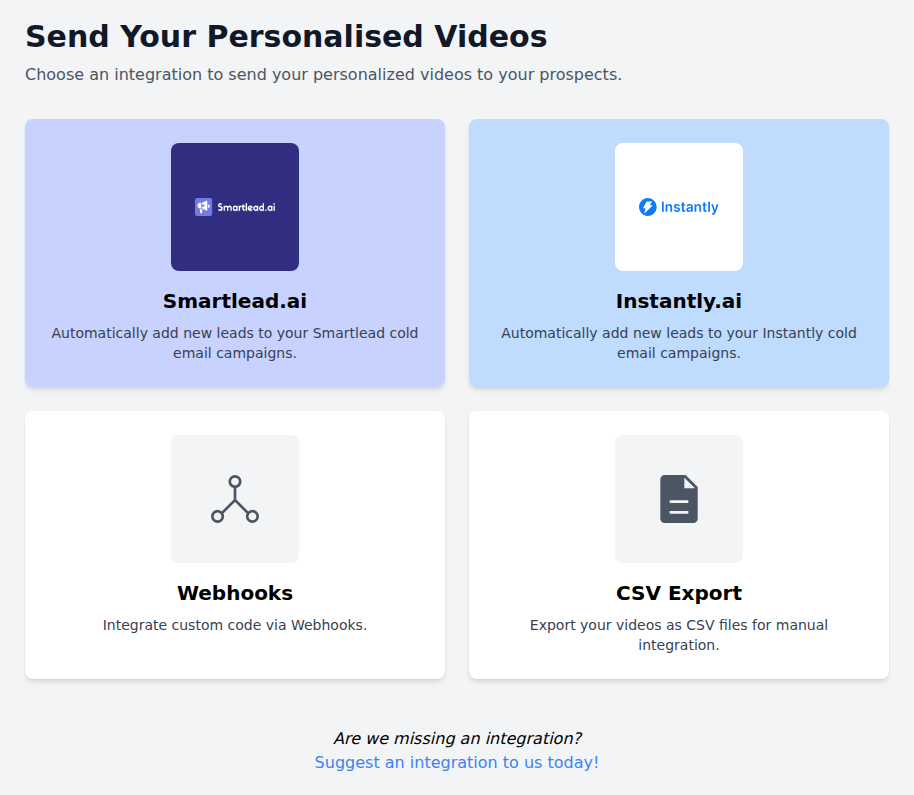
For a small-team/high-volume workflow, record once for a coherent segment, review one representative output and the exceptions, then hand reviewed assets to the sender the team already operates. For segmentation and QA beyond platform selection, use the personalized outreach at scale operating model. For campaign execution, follow the video prospecting workflow.
Free video email software: plans versus trials
A free recorder, a time-limited trial, and a complete team workflow are different purchases. The table keeps those offer types separate.
| Tool | No-cost offer | Practical use |
|---|---|---|
| Loom | Ongoing Starter plan with 25 videos per person and a five-minute recording limit | Test manual one-to-one recording and sharing |
| Vidyard | Ongoing Free plan with no card required; five recorded videos per month, up to 30 minutes each | Test the basic recording and sharing path |
| Sendspark | Seven-day trial with no card required | Test generated voice/background personalization and its workflow |
| BombBomb | Free trial; no free-forever plan, trial duration, or card terms are published in the current offer | Test the recording and video-messaging path on the intended package |
Check the current offer before signup. Free limits can answer whether the workflow feels right, but they do not make unlike pricing units comparable. A seat, a stored recording, a Dynamic Video Minute, a workflow task, and a rendered lead video are different units.
Video email platform versus video sales tool
A video email platform decision centers on the message and destination: the preview, fallback, hosted playback, sending handoff, and email-related signals. A video sales tool decision is wider. It can include recording, list import, generation, hosting, campaign QA, integrations, sending, analytics, and team administration across the sales process.
If the hard question is what appears in the inbox and where the click goes, stay on this comparison. If the team is selecting the full creation-to-sales-stack workflow, compare video sales tools.
Final pick by reader
- Solo seller recording a few bespoke messages: Loom.
- Rep who wants recording inside Gmail, Outlook, browser, or mobile workflows: BombBomb.
- Small outbound team reusing one spoken pitch across a coherent segment: Pitchlane.
- Team that requires generated spoken names or cloned-voice variation: Sendspark.
- Revenue organization buying broader recording, hosting, analytics, and integration scope: Vidyard.
If the Pitchlane trade-off fits—one fixed spoken pitch, each prospect’s website as context, and your current sender staying in charge—review Pitchlane pricing or create a test campaign.